How Can Hospitals Reduce Patient Waiting Time with Vital Health Screening Kiosks?
Quick Answer: Hospitals can reduce patient waiting time by introducing vital health screening kiosks that automate initial patient registration, capture basic health information, measure vital signs and digitally record screening results. By completing these preliminary activities before a consultation, hospitals can reduce manual administrative work, avoid repetitive data entry and help healthcare professionals manage patient flow more efficiently.
A vital health screening kiosk brings multiple preliminary screening activities into one digital platform. It can help hospitals streamline outpatient department (OPD) registration, reduce queues at reception, improve the availability of patient information and support a more organized healthcare experience.
Why Do Patients Experience Long Waiting Times in Hospitals?
Long waiting times are a common challenge for hospitals, particularly in outpatient departments, diagnostic centres and high patient volume healthcare facilities.
When several patients arrive at the same time, registration counters, preliminary health assessments and consultation rooms can become congested. Manual processes often add further delays.
Some common reasons include:
1. Manual Patient Registration
Patients may need to wait at reception to provide their personal information, confirm appointments and complete registration formalities. Repeatedly collecting the same information can increase administrative workload.
2. Delays in Initial Health Screening
Before meeting a healthcare professional, patients may need their height, weight, blood pressure, temperature and other vital signs measured. When these activities depend entirely on available staff, patients may experience additional waiting time.
3. Repetitive Data Entry
When patient information is collected manually and entered separately into patient registration software, the same details may need to be recorded multiple times.
This increases administrative effort and creates opportunities for data entry errors.
4. Overcrowded Registration Counters
Hospitals with high daily patient volumes may experience long queues during peak hours. Limited registration counters and manual verification procedures can slow down the entire patient admission process.
5. Delayed Information Sharing
When preliminary screening information is not readily available to healthcare professionals, additional time may be required to retrieve records and understand the patient’s initial health details.
These challenges indicate the need for a more connected and efficient patient management process.
What Is a Vital Health Screening Kiosk?
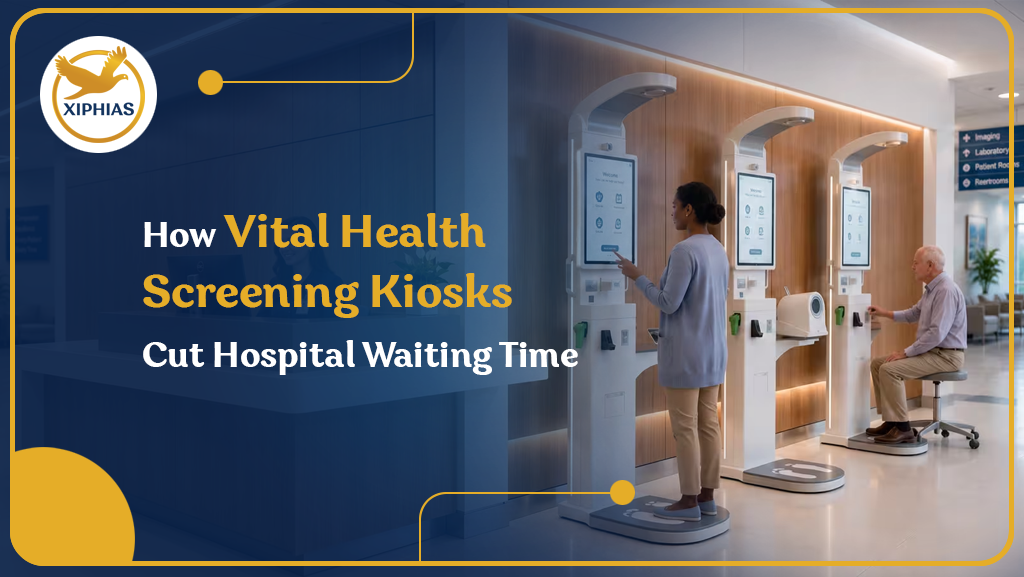
A vital health screening kiosk is a digital healthcare station that enables patients to complete selected preliminary health screening activities through an interactive touchscreen interface and integrated medical measurement devices.
Depending on its configuration, a healthcare screening kiosk can collect patient details, measure vital signs, calculate Body Mass Index (BMI) and digitally record preliminary screening results.
It can support measurements such as:
- Height and weight measurement
- Body Mass Index (BMI) calculation
- Blood pressure monitoring
- Blood oxygen saturation (SpO₂)
- Body temperature measurement
- Other supported preliminary health assessments
The collected information can be made available to authorized healthcare professionals through compatible hospital information systems (HIS), Electronic Medical Records (EMR) or Electronic Health Records (EHR).
Unlike traditional screening procedures that rely entirely on manual data collection, a digital health screening kiosk helps organize preliminary patient information through a structured digital workflow.
Its primary purpose is to support preliminary health screening and improve hospital workflow. It does not replace professional medical diagnosis, clinical assessment or emergency triage.
How Can Vital Health Screening Kiosks Reduce Patient Waiting Time?
A vital health screening kiosk helps hospitals improve different stages of the patient journey. Instead of handling every preliminary activity through separate manual processes, hospitals can bring several tasks together through a connected digital screening system.
1. Automate Initial Patient Registration
Traditional registration requires patients to interact with reception staff for basic information collection and verification.
With a patient check in kiosk, patients can enter their relevant details through a touchscreen interface. Depending on the integration, the kiosk can also support appointment confirmation, patient identification and registration record retrieval.
This helps:
- Reduce queues at reception counters.
- Minimize repetitive administrative tasks.
- Improve the accuracy of patient information.
- Allow reception staff to focus on patients who need additional assistance.
Automated patient registration is particularly useful for outpatient departments, health centres and hospitals handling frequent patient visits.
2. Speed Up Preliminary Vital Signs Measurement
One of the major advantages of a vital health screening kiosk is its ability to bring selected health measurements into the initial patient workflow.
Instead of waiting separately for each preliminary measurement, patients can use an integrated screening station to record supported vital signs.
For example, a kiosk configured with suitable medical devices can capture:
- Height and weight.
- Blood pressure.
- Body temperature.
- Oxygen saturation.
- BMI.
These measurements can be recorded digitally and made available for clinical review.
3. Reduce Repetitive Data Entry Through HIS and EMR Integration
When patient screening information is recorded manually, healthcare staff may need to enter the same details into multiple systems.
A healthcare kiosk with Hospital Information System (HIS), Electronic Medical Record (EMR) or Electronic Health Record (EHR) integration can help streamline this process.
For example:
- The patient completes the preliminary screening.
- The kiosk records the supported measurements.
- Relevant information is transferred to the connected hospital system.
- Authorized healthcare professionals access the recorded information.
- The clinician reviews the information during the consultation.
This reduces unnecessary information duplication and improves access to preliminary patient records.
Integration capabilities depend on the hospital’s existing software, supported interfaces and implementation requirements.
4. Improve Patient Flow Across OPD Departments
Patient waiting time is not limited to registration. Delays can occur between registration, initial screening and consultation.
A vital health screening kiosk can help organize the initial stages by making patient information available before the consultation begins.
For example, an outpatient department can establish a workflow where patients complete registration and preliminary screening before moving to the designated consultation area.
When combined with a digital token or queue management system, hospitals can also improve patient movement between service points.
This helps staff understand which patients have completed initial screening and which patients need assistance.
5. Provide Multilingual Screening Instructions
Language barriers can make hospital registration and preliminary screening difficult, particularly in healthcare facilities serving patients from different linguistic backgrounds.
A multilingual healthcare kiosk allows patients to follow instructions in a language they understand.
Touchscreen instructions can guide patients through registration, measurement and screening activities.
This can help:
- Reduce confusion during patient registration.
- Minimize repeated assistance requests.
- Improve the patient experience.
- Make digital screening more accessible to diverse patient groups.
A multilingual interface is especially useful for hospitals and healthcare organisations serving international or multicultural communities.
6. Generate and Share Digital Screening Reports
Manual recording and documentation can increase the workload of healthcare professionals.
A digital health kiosk can generate preliminary screening reports containing the measurements captured during the session.
Depending on system configuration, the reports can be stored, accessed or shared with authorized healthcare professionals through connected hospital systems.
This helps hospitals maintain organized screening records and reduces dependence on paper based documentation.
How Does a Vital Health Screening Kiosk Work in a Hospital?
A digital screening kiosk can be introduced into the patient journey through four basic steps.
Step 1: Register and Identify the Patient
Patients enter their details or retrieve their existing appointment information through the kiosk. The system can support patient identification and registration based on the hospital’s workflow.
Step 2: Measure Vital Signs
Patients follow the on screen instructions to complete supported health measurements, such as height, weight, blood pressure, temperature and SpO₂.
Step 3: Review Screening Results
The system displays the recorded preliminary measurements. Patients can complete the screening process, while the information is made available for authorized healthcare staff to review.
Step 4: Generate and Share Reports
The kiosk generates a digital screening record. Relevant information can be transferred to compatible HIS or EMR platforms to support the next stage of patient care.
This workflow helps hospitals organize preliminary screening activities before the patient proceeds to consultation.
Which Features Should Hospitals Look for in a Vital Health Screening Kiosk?
Selecting the right vital health screening kiosk requires more than considering its touchscreen interface. Hospitals should evaluate the measurement capabilities, software integration, accessibility and long term operational requirements.
| Essential feature | How it helps hospitals |
|---|---|
| Automated patient registration | Reduces manual registration activities |
| Integrated medical devices | Supports preliminary vital signs measurement |
| BMI calculation | Provides calculated height and weight information |
| HIS and EMR integration | Improves digital information exchange |
| Multilingual touchscreen | Supports patients from different language backgrounds |
| Digital screening reports | Simplifies preliminary record management |
| Secure data management | Helps protect sensitive patient information |
| User friendly interface | Makes screening easier for different age groups |
| Hygiene and sanitization support | Supports safe use between patient sessions |
| Accessible kiosk design | Helps accommodate patients with different needs |
The right configuration depends on the hospital’s patient volume, clinical requirements, existing software infrastructure and screening procedures.
Where Can Hospitals Use Vital Health Screening Kiosks?
Vital health screening kiosks can support preliminary health assessments across different healthcare environments.
1. Multispecialty Hospitals
Hospitals can use screening kiosks in outpatient departments to organize initial patient registration and vital signs measurement.
2. Primary Healthcare Centres
Healthcare centres can use digital screening solutions to support routine preliminary health assessments and maintain digital patient records.
3. Diagnostic Centres
Diagnostic facilities can introduce screening kiosks to collect basic patient information and supported measurements before selected services.
4. Corporate Healthcare Facilities
Organizations can use vital health screening kiosks to support employee health checks and preliminary wellness assessments.
5. Preventive Healthcare Centres
Preventive care facilities can use digital health screening systems to organize routine health assessments and monitor recorded screening information over time.
How Can Hospitals Successfully Implement a Digital Health Screening Kiosk?
Introducing a kiosk alone does not automatically eliminate hospital queues. Hospitals need to align the technology with their existing patient management processes.
Here are some important implementation considerations.
1. Identify High Traffic Areas
Place kiosks in accessible locations near registration areas or designated preliminary screening sections, without obstructing patient movement.
2. Integrate Existing Hospital Software
Ensure that the kiosk can exchange relevant patient information with compatible HIS, EMR or EHR platforms to avoid disconnected data collection.
3. Maintain Staff Assistance
Provide support for elderly patients, individuals with disabilities and patients who are unfamiliar with touchscreen interfaces.
4. Establish Hygiene Procedures
Frequently clean patient contact surfaces and follow appropriate sanitization procedures for integrated medical devices.
5. Protect Patient Information
Implement suitable access controls, data encryption, consent procedures and privacy safeguards according to applicable healthcare regulations.
6. Monitor Patient Flow Performance
Track registration duration, screening completion time, queue length and patient feedback to identify areas that require improvement.
Hospitals should also maintain a manual assistance process and ensure that patients requiring urgent clinical attention are directed to healthcare professionals without unnecessary kiosk procedures.
Frequently Asked Questions
1. Can a vital health screening kiosk reduce patient waiting time?
Yes. A vital health screening kiosk can help reduce waiting associated with manual registration, preliminary vital signs measurement and repetitive data entry. The actual improvement depends on patient volume, kiosk usage, software integration and hospital workflow.
2. What vital signs can a healthcare screening kiosk measure?
Depending on its medical device configuration, a healthcare screening kiosk can measure height, weight, blood pressure, body temperature and oxygen saturation (SpO₂). It can also calculate BMI using height and weight measurements.
3. Can a health screening kiosk integrate with hospital management software?
Yes. Compatible healthcare kiosks can integrate with Hospital Information Systems (HIS), Electronic Medical Records (EMR) and Electronic Health Records (EHR). Integration helps transfer relevant patient and screening information between systems.
4. How does a digital screening kiosk improve patient experience?
It allows patients to complete selected registration and preliminary screening activities through a guided digital interface. Multilingual instructions, structured workflows and reduced repetitive information collection can make the hospital experience more convenient.
5. Can a vital health screening kiosk replace nurses?
No. A vital health screening kiosk supports preliminary screening and information collection. Nurses and other qualified healthcare professionals remain responsible for clinical assessment, validation of measurements, patient care and medical decisions.
6. Is a vital health screening kiosk suitable for small hospitals?
Yes. Small hospitals, clinics and diagnostic centres can consider digital screening kiosks based on their patient volume, available space, screening requirements and software infrastructure. The system should be configured according to their operational needs.
7. Are vital health screening kiosks suitable for emergency departments?
They may support selected administrative and preliminary screening workflows for suitable patients. However, they must not delay emergency assessment or replace clinician led triage. Patients requiring urgent care should be directed to medical staff immediately.
Conclusion: Build a More Efficient Patient Screening Process
Reducing patient waiting time requires hospitals to improve more than just registration procedures. Preliminary screening, information management and coordination between departments also play an important role in creating an efficient patient journey.
A vital health screening kiosk helps hospitals bring patient registration, supported vital signs measurement and digital screening records into one structured workflow. With appropriate HIS and EMR integration, accessible interfaces and staff support, it can reduce avoidable administrative delays and improve the availability of preliminary patient information.
For hospitals looking to modernize their screening processes, a digital health screening solution can be a practical step towards more organized and efficient healthcare delivery.
Explore XIPHIAS Vital Health Digital Screening Kiosk to discover how digital screening technology can support modern hospital workflows.
Similar Posts
Streamlining Healthcare: The Role of Telemedicine Kiosks in Modern Medical Practices
Telemedicine kiosks are rapidly transforming the healthcare landscape, offering innovative solutions for patient care. These kiosks provide remote consultations, connecting patients with healthcare providers conveniently…
How Patient Check-In Healthcare Kiosks Revolutionize Hospital Efficiency?
In the modern healthcare landscape, operational efficiency is critical to providing top-quality patient care while managing resources effectively. Patient check-in healthcare kiosks have emerged as…


Transform Your Business with a 32 Inch Touch Screen Kiosk Machine
In today’s digital age, businesses are constantly seeking innovative ways to enhance customer engagement and streamline operations. One such technology that is revolutionizing the way…