
Visitor Kiosks and Visitor Management Systems: How They Work and How to Choose (2026)
A visitor management system is software that registers, screens, badges and tracks every guest who enters a building. Visitor kiosks are the self-service touchscreens guests use to check in, while the system stores each visit and alerts the host automatically. Together they replace paper sign-in sheets with a secure, searchable record.
What Is a Visitor Management System and What Are Visitor Kiosks?
A visitor management system (VMS) is the software behind your front desk. It handles the full visit: pre-registration, check-in, badge printing, host notification, screening, on-site tracking and check-out. Every visit is saved as a digital record.
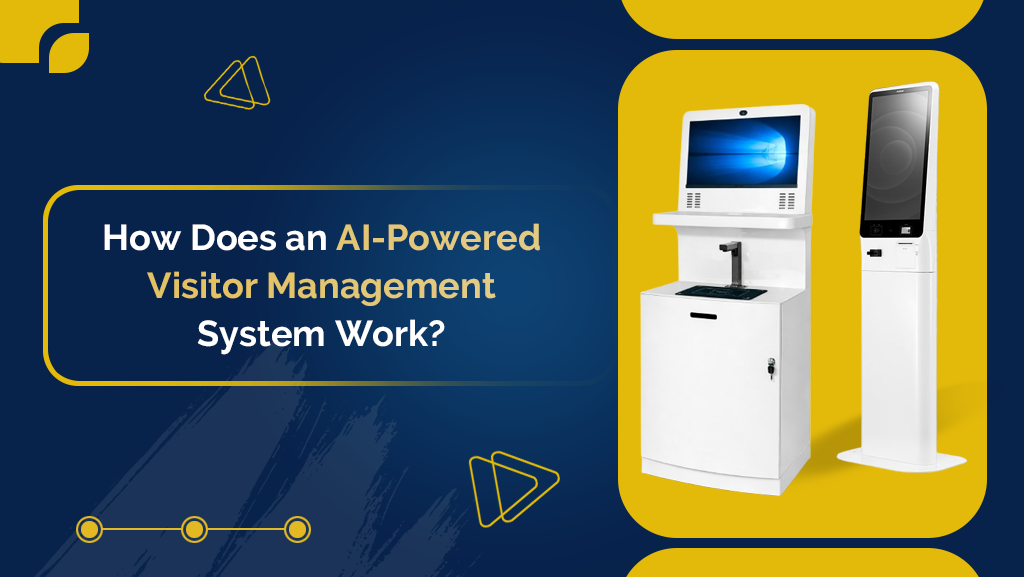
Visitor kiosks are the physical side of that system. They are touchscreen stations, usually a tablet or dedicated terminal, placed at an entrance or reception area so guests can check themselves in.
A typical check-in takes six steps:
- The guest taps the screen or scans a QR code from their pre-registration email.
- They enter their name, company, host and purpose of visit. Some sites add a photo or ID scan.
- The visitor management system screens them against any watchlist and can require an NDA or safety acknowledgment.
- A badge prints with the guest’s name, photo, host and an expiry time.
- The host receives an instant alert by text, email or app.
- The visit is logged and the guest is checked out when they leave.
Why Use Visitor Kiosks Instead of a Paper Sign-In Sheet?
A kiosk replaces the sign-in book with a timestamped digital record that is far harder to falsify than a handwritten one and that other guests cannot read. A paper log has no safeguards: anyone can write a fake name and every visitor can see who signed in before them.
Visitor Kiosks vs. Paper Sign-In vs. Receptionist
| Feature | Paper sign-in sheet | Receptionist check-in | Visitor kiosk with a visitor management system |
|---|---|---|---|
| Identity verification | None | Manual, inconsistent | ID scan and photo capture |
| Privacy of visitor data | Visible to every guest | Depends on process | Stored securely, not visible to guests |
| Host notification | Manual | Phone call or message | Automatic, instant |
| Badge printing | Handwritten or none | Manual | Automatic, with expiry time |
| Watchlist screening | No | Rarely | Yes |
| Emergency headcount | Unreliable | Partial | Real-time list |
| Staff time required | Low | High | Minimal |
The benefits go beyond the table:
- Security. ID scanning, photo capture, watchlist screening and expiring badges show who belongs on site.
- Compliance. Healthcare, education and manufacturing sites need a clear log of who entered and when. The system keeps one automatically.
- Emergencies. In a fire drill or evacuation, staff can pull a real-time list of everyone on site, including visitors and contractors.
- Guest experience. Branded screens, welcome messages and multi-language support replace an awkward wait at an empty desk.
- Staff time. Badge printing, data entry and host alerts run on their own, so reception can focus on deliveries and calls.
Who Uses Visitor Management Systems?
Any site that regularly hosts outside guests benefits. The most common users are:
- Corporate offices and co-working spaces: meeting guests, interviews and deliveries.
- Healthcare facilities: patient visitors and vendors, where records and safety rules matter.
- Schools and universities: parents, contractors and event guests.
- Factories and warehouses: contractors and auditors who need a safety induction before getting a badge.
- Residential and event venues: high volumes of short visits.
On the inside, three groups use the system every day: front-desk staff, who stop logging guests by hand, hosts, who get instant alerts, and security or facility managers, who see a live view of who is on site.
Which Visitor Management System Is Right for You?
The right visitor management system depends on six factors: visitor volume, security requirements, integrations, customization, ease of use and scalability.
- Visitor volume. High-traffic locations may need multiple visitor kiosks or faster hardware.
- Security requirements. Facilities with sensitive information may need ID verification and watchlist screening.
- Integrations. Check that it connects with your access control, calendar and camera systems, so scheduled guests can be pre-registered and issued temporary door access.
- Customization. Branded screens and badges reinforce a professional image.
- Ease of use. A simple interface reduces confusion for first-time visitors.
- Scalability. Multi-site operators need a platform that syncs data, badges and access rules across every building.
Ready to replace your front-desk clipboard? Book a demo to see how visitor kiosks and a visitor management system would work at your facility.
Where Do Visitor Kiosks Work Best?
Visitor kiosks work best wherever guests arrive faster than one receptionist can handle them, or where no receptionist is on duty.
Choose the hardware to match the space: a tablet stand for a small office, a wall-mounted unit where floor space is tight, or a floor-standing terminal for a busy lobby.
Final Thoughts
Visitor kiosks are more than a digital sign-in sheet. Paired with the right visitor management system, they improve security, save staff time and create a better first impression for everyone who walks through your door.
Want to see it in action? Book a demo and we will walk you through a setup for your facility.
Similar Posts
Boosting Productivity: The Impact of Visitor and Vendor Management Kiosks
In today’s fast-paced business environment, efficiency is key to productivity. Managing visitors and vendors can become time-consuming and chaotic for organizations. A visitor and vendor…
How Visitor Management Kiosk Software Can Optimize Security in Your Facility?
In today’s fast-paced world, security and safety are paramount concerns for businesses and organizations of all sizes. Implementing effective visitor management systems has become essential…
Why Every Business Needs a Visitor Management Kiosk: Key Advantages and Implementation Tips
In today’s fast-paced business environment, managing visitors effectively is more important than ever. Whether you run a large corporation, a healthcare facility, or a small…
Revolutionize Your Front Desk with Visitor Management Self Registration Kiosk
In today’s fast-paced business environment, first impressions matter more than ever. The front desk of any organization is often the first point of contact for…